
In this article
Useful transactional email metrics include task completion, time to completion, delivery failures, and resend demand. A verification email succeeds when someone completes verification; an open-rate chart alone cannot establish that the link worked, the token remained valid, or the user reached the next screen.
Start your measurement plan with the task the message supports. Then instrument the steps between the application’s decision to send and the user’s completed action. That produces a dashboard an engineer can investigate and a product team can use.
Treat opens as a limited signal
An open event generally reflects activity around a tracking image, not a direct observation of human attention. Apple documents that Mail Privacy Protection prevents senders from seeing whether a message was opened.
Mailgun’s April 2026 article on lower recorded Gmail open rates likewise recommends checking other signals before concluding that delivery deteriorated. Its proposed explanation for Gmail image handling was observational, not a confirmed Google announcement.
Keep opens if they help explain a trend, but do not make “no recorded open” the sole reason to resend a verification email or remove someone from an active product workflow. A user may have completed the task while your open counter remained unchanged.
Name each stage precisely
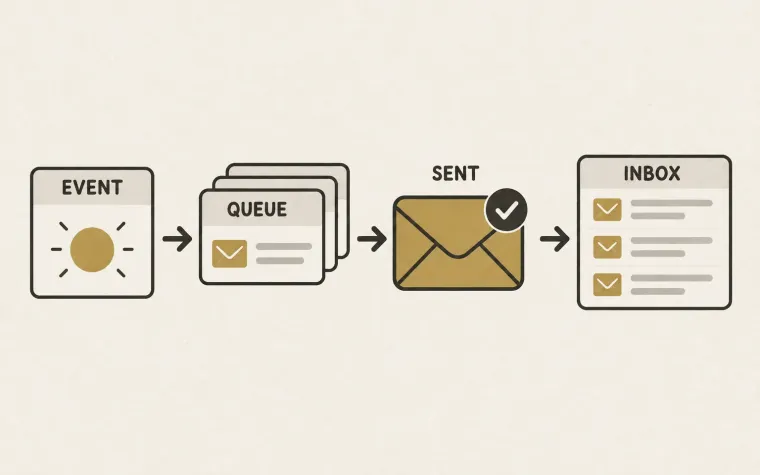
Avoid one ambiguous “sent” column. Define the stages in terms of evidence your systems actually possess.
| Stage | What your record establishes |
|---|---|
| Intent created | The application decided a notification was needed |
| Submission accepted | The sending service accepted the request |
| Receiver accepted | Available delivery evidence reports acceptance by the receiving server |
| User task completed | The product recorded the intended action |
Receiver acceptance is useful transport evidence, but it is not proof that the message appeared in the primary inbox or that a person read it. SMTP acceptance carries responsibility for the message’s subsequent handling; it is not a read receipt. See RFC 5321’s treatment of responsibility after acceptance.
If you are evaluating APRF aggregate email feedback, keep its proposed mailbox reporting separate from application task-completion data. Each answers a different measurement question.
Maintain a mapping between your internal intent identifier and the provider message identifier. One business intent can have several attempts, and one attempt can have several events. Count those entities deliberately rather than treating every event as a new email.
Choose a product outcome for each message class
Different messages deserve different success criteria. A password-recovery email can be evaluated against completed recovery. An invitation can be evaluated against accepted membership. A receipt may have no intended click at all.
For messages that are primarily informational, focus on reliability, unwanted duplicates, and related support contacts. Do not invent a click goal that encourages unnecessary buttons in a receipt.
A practical starter set is:
- Task completion: the share of eligible requests that reach the intended product state within a defined window.
- Time to completion: elapsed time from the user request to that state.
- Resend demand: how often users request another copy before completing the task.
- Transport failure: distinct message attempts with a final delivery failure.
- Unknown outcome: accepted attempts whose expected outcome has not arrived by your observation deadline.
Report unknown outcomes explicitly. Otherwise, missing event ingestion can make failure rates appear to improve.
Build cohorts around the user’s request
Suppose a hypothetical verification cohort contains 1,000 eligible requests from Monday. By the end of a 24-hour observation window, 980 have a submission accepted, 960 have receiver acceptance recorded, and 700 have completed verification.
The completion rate for that request cohort is 700 divided by 1,000, or 70%. It is not 700 divided by the number of open events. The difference between request volume and accepted submissions is itself work to investigate.
These numbers are an illustration, not SendMero performance data or an industry benchmark.
Define eligibility before viewing results. Exclude internal tests and known invalid requests under a documented rule, and show the excluded count. Changing the denominator after a weak result makes the chart difficult to trust.
Let cohorts mature. Requests from five minutes ago have had less opportunity to complete than yesterday’s requests. Compare cohorts with the same observation window, and label recent ones as incomplete.
Separate the different kinds of delay
Record timestamps for the user request, intent creation, submission, reported receiver acceptance, event ingestion, and product completion where available.
These reveal different problems. A long request-to-submission interval suggests application queuing. A growing gap between the provider’s event time and your ingestion time suggests delayed reporting. Slow completion despite prompt transport may point to confusing content or a product problem.
Use consistent timestamp formats and account for clock differences before interpreting small gaps. Show a high percentile alongside the median so a minority of very late messages is visible. Keep event-reporting delay separate from delivery delay.
Segment only when the segment helps a decision
Start with message class, recipient mailbox provider when known, template version, application release, and request origin. Compare a changed flow with a stable flow during the same period.
If one template’s completion declines while its transport metrics remain steady, inspect the link destination and application experience. If several templates fail for one receiving provider, investigate that provider’s delivery responses. If every metric changes at deployment time, verify the instrumentation too.
Avoid claiming that an email caused every later purchase or activation. A person may return through a bookmark or another channel. Outcome association is useful; measuring incremental effect requires a suitable experiment and careful treatment of essential transactional messages.
Make the dashboard lead to a next step
Every alert should identify an owner, affected cohort, observation window, and investigation link. Keep raw addresses and recovery tokens out of analytics labels; use internal identifiers with controlled access when a detailed investigation needs them.
Test missing, repeated, and delayed events using the safe email testing workflow. Link each sending stream to its owner in the infrastructure inventory.
The useful outcome is a team that can explain why users are stuck and identify the next correction. Explore SendMero’s email tooling as part of that wider application measurement plan.