In this article
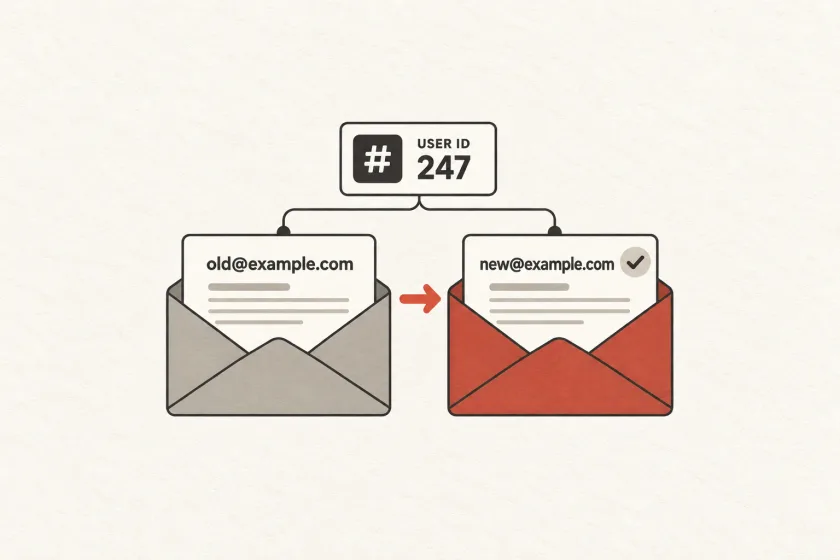
Use a stable internal user ID as the permanent account key, and store the email address as a changeable contact record. A verified address-change workflow can then update where mail is sent without reassigning purchases, memberships, or preferences.
People change employers, adopt new addresses, and use aliases. Your product should be able to change the destination of future mail without accidentally creating a new customer or transferring someone else’s access.
Keep identity stable while contact details change
Mailgun’s April 2026 discussion of Gmail address changes brought renewed attention to duplicate subscriptions and preference handling. Google’s own account documentation confirms that, for supported Gmail-to-Gmail changes, mail to both addresses reaches the account.
That does not give your application a reliable way to discover which arbitrary addresses belong to the same person. Let a verified, authenticated workflow establish the relationship.
Use an immutable internal user identifier for ownership and relationships. Keep email addresses in a separate contact record. A simplified application model might look like this:
User
  id
  primary_email_contact_id

EmailContact
  id
  user_id
  address
  verified_at
  status

PendingEmailChange
  id
  user_id
  proposed_contact_id
  expected_account_version
  expires_at
  consumed_at
This is an illustrative model, not a SendMero schema. The important separation is between the account, a particular contact address, and a proposed change that has not yet taken effect.
Store memberships and purchases against the user identifier. A new contact address should not require rewriting historical ownership records.
Treat a change as a workflow
A text field update is insufficient when the address also supports login or recovery. Establish that the requester can authorize the change, verify the proposed destination, and make the final transition explicit.
OWASP’s email identity guidance recommends reauthentication, notification to the existing address, and confirmation of the new address, with stronger confirmation for higher-risk situations. It also recommends time-limited, single-use verification tokens.
The email verification flow guide covers token expiry, repeated requests, and the distinction between submitting a message and proving address ownership.
Build the workflow around these states:
- Requested: the authenticated user proposes a new address and completes the required identity check.
- Pending: the application records the proposal without replacing the active contact.
- Verified: the user proves control of the proposed address through a valid confirmation flow.
- Committed: one atomic update consumes the pending change and selects the new primary contact.
- Expired or cancelled: the proposal can no longer alter the account.
Bind confirmation to the specific account and pending-change record. If the user requests a different address before confirming the first one, retire the earlier proposal. An old confirmation must not silently overwrite the newer choice.
Use an account version or equivalent concurrency check at commit time. Two browser tabs should not be able to independently finalize competing changes against stale state.
Define what happens to queued messages
An address change can race with a notification worker. A receipt may already be queued for the old address while a verification message is on its way to the new one.
Choose a policy by message type. A pending-address confirmation must target its specific proposed contact. A new account notification can resolve the current verified primary address at submission time. A legally or operationally significant historical message may need a recorded destination and a separate resend action rather than silent rewriting.
Store both the recipient contact identifier and the address used for each actual send. That provides an audit trail without making the address your account key.
For sensitive messages, decide whether a contact change invalidates pending sends. Re-evaluate eligibility before sending instead of assuming that yesterday’s queue entry still represents today’s intended recipient.
Keep preferences and delivery failures distinct
A user’s decision about product updates is different from a receiving server’s report that one address no longer accepts mail.
Model preference scope explicitly. A user may opt out of a particular newsletter, all optional product updates, or messages for one workspace. An address-level delivery suppression concerns that destination and should not erase the account’s preferences.
When a user verifies a replacement address, preserve their existing optional-message choices unless they explicitly change them. Do not interpret an address update as a fresh subscription.
Also protect against late delivery events. A bounce for the old contact should update that contact’s delivery status. It should not suppress the new address merely because both records belong to the same user. Associate the event with the original send and contact identifier before changing state.
The same distinction helps measure user outcomes: one person changing an address should not look like a lost user followed by a newly acquired one.
Do not merge accounts from address resemblance
Two addresses that look related are not evidence that their accounts should be combined. Removing dots, stripping tags, or applying one provider’s alias behavior to every domain can create collisions.
Define a consistent address comparison policy and apply it across registration, sign-in, recovery, and account changes. Preserve the entered address for communication. An authenticated account-linking workflow should make ownership and merge consequences explicit.
If the proposed address already belongs to another account under your policy, route the user to an appropriate recovery or linking process. Avoid revealing another account’s details in the response.
Exercise the awkward cases before release
Use captured email and controlled recipients from the staging testing guide to verify these cases:
- An expired confirmation cannot change the address.
- A second request retires the first pending change.
- Repeated confirmation commits only once.
- A late bounce affects the old contact only.
- An optional-message opt-out survives the change.
- Two simultaneous confirmations cannot bypass account uniqueness rules.
If a user has lost access to the old address, use a defined recovery process with appropriate identity checks. Do not let an informal support exception become an easier route around the normal protections.
Email delivery is one component of this workflow. Keep its integration behind a clear boundary and use the SendMero documentation for transport details. Account identity, authorization, and preference semantics remain decisions your application must own.