In this article
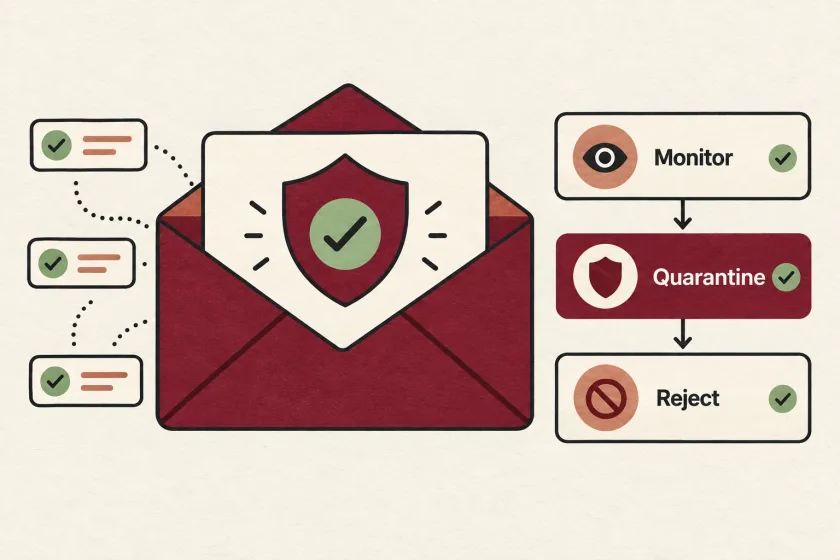
A DMARC rollout starts with a sender inventory, verifies SPF or DKIM alignment on real messages, and uses aggregate reports to find legitimate mail that needs fixing. Begin with monitoring, then move to enforcement when the evidence supports it, with an owner who can restore the previous policy if needed.
Publishing the record is a small DNS change with a large organizational dependency: knowing every system that legitimately sends as your domain. Product engineering may know the application mailer while finance uses a billing service and support sends through another platform. Each path needs evidence before enforcement.
Resend’s July article, The New DMARC is Here, prompted renewed attention to this work. The updated core standard is RFC 9989, published in May 2026. Its publication does not mean every receiver and administrative tool changed behavior on the same date.
Build a sender inventory that someone can maintain
Create one row per sending system and From domain. Include a business owner, technical owner, sending purpose, and evidence from a real received message. Give each row a status such as verified, needs investigation, or retired.
An illustrative inventory could contain:
| System | Visible From domain | Owner | Evidence still needed |
|---|---|---|---|
| Application mailer | notify.example.com | Product engineering | Production password-reset sample |
| Billing service | example.com | Finance systems | Monthly invoice sample |
| Help desk | support.example.com | Support operations | Reply sent through the ticketing system |
Include infrequent senders. A week of observation may never include a monthly invoice or a quarterly customer statement. Ask owners to produce representative messages instead of waiting indefinitely for them to appear in a report.
For retired systems, document how authorization was removed. “We stopped using it” leaves an unresolved dependency if its credentials and DNS configuration remain active.
Inspect authentication on actual messages
SPF evaluates authorization for the SMTP identity, and DKIM verifies a signature associated with a signing domain. The protocols are defined in RFC 7208 and RFC 6376. Inspect the received message’s authentication results rather than relying only on a setup screen.
DMARC requires a passing SPF or DKIM result whose domain aligns with the visible From domain. Strict alignment requires an exact domain match; relaxed alignment uses the organizational domain. A pass does not promise inbox placement. See RFC 9989, sections 4.3–4.4.
For each inventory row, save a compact evidence note: test date, From domain, authenticated domains, results, and message identifier. Avoid copying the entire message into a shared document if it contains customer information.
Have the system owner explain any unexpected identity. A signature from a vendor domain may be valid yet fail to provide the alignment you intended. Resolve the configuration with the sending service before changing enforcement.
Make monitoring produce decisions
A starting record for an illustrative domain might be:
_dmarc.example.com TXT "v=DMARC1; p=none; rua=mailto:dmarc-reports@example.com"Replace the example address with a working reporting destination. Assign someone to review it and confirm reports actually arrive. A mailbox full of unread XML is storage, not an operational control.
Aggregate reports describe authentication results, sending sources, and observed dispositions; the current format is specified in RFC 9990. Use those fields to maintain three work queues: known senders requiring fixes, unknown sources requiring identification, and explained failures that need no sender authorization.
Do not automatically add every unknown source to your authorized configuration. Match it to a business owner and a message path first. Keep a record of what was investigated, who decided, and which evidence supported the outcome.
Account for the 2026 specification carefully
RFC 9989 replaces percentage enforcement through pct with a testing signal, t. Under the new rules, t=y lowers a requested quarantine policy to none, and reject to quarantine. It is not a universal monitoring switch. The standard also changes policy discovery to a DNS tree walk. See the policy tags and DNS discovery.
For a conservative initial rollout, use an explicit p=none while investigating senders. Do not depend on a new testing tag to protect mail at receivers whose implementation you have not established.
Check dependent services before removing old tags. For example, Apple’s current Branded Mail verification instructions still specify pct=100. Record that compatibility requirement rather than applying a blanket DNS cleanup.
If an inbox logo is part of the project, compare the separate requirements for Apple Branded Mail and BIMI. Finish authentication work before tightening policy to satisfy a branding prerequisite.
Introduce enforcement with a recovery owner
Before a policy change, review the inventory with the teams that own billing, support, account access, and marketing. Every unresolved legitimate sender needs an explicit decision. “Probably unused” is not a verified status.
Save the previous DNS record, identify who can restore it, and document the DNS TTL. Schedule the change when those owners can inspect their systems. Use received tests and report evidence together; neither a single test nor a domain-wide percentage describes every message path.
Move to the selected enforcement policy only when the evidence supports it. If you first choose quarantine, observe the affected streams before considering reject. The interval should cover your actual sending cycles and investigation needs, not an arbitrary countdown.
If legitimate mail fails, pause further policy changes, identify the affected path, and restore an appropriate previous policy if necessary. DNS caches mean recovery is not instantaneous. Record the cause so the same forgotten system does not block the next attempt.
Make the inventory part of onboarding new tools
After rollout, require a sender inventory update whenever someone adds an email service or changes a From domain. Review reports after migrations, credential changes, and DNS work. Retest infrequent but important streams during their normal business cycles.
Authentication should also precede a planned increase in email volume. For application delivery, consult the SendMero documentation and verify the records supplied for your actual configuration.